Your Shopify conversion rate is the share of visits that end in an order. More traffic helps, but if few visitors buy, raising the conversion rate is often the cheaper way to grow. This guide covers the changes that tend to matter most: product pages, trust, shipping costs, checkout, mobile, and how to test what works.
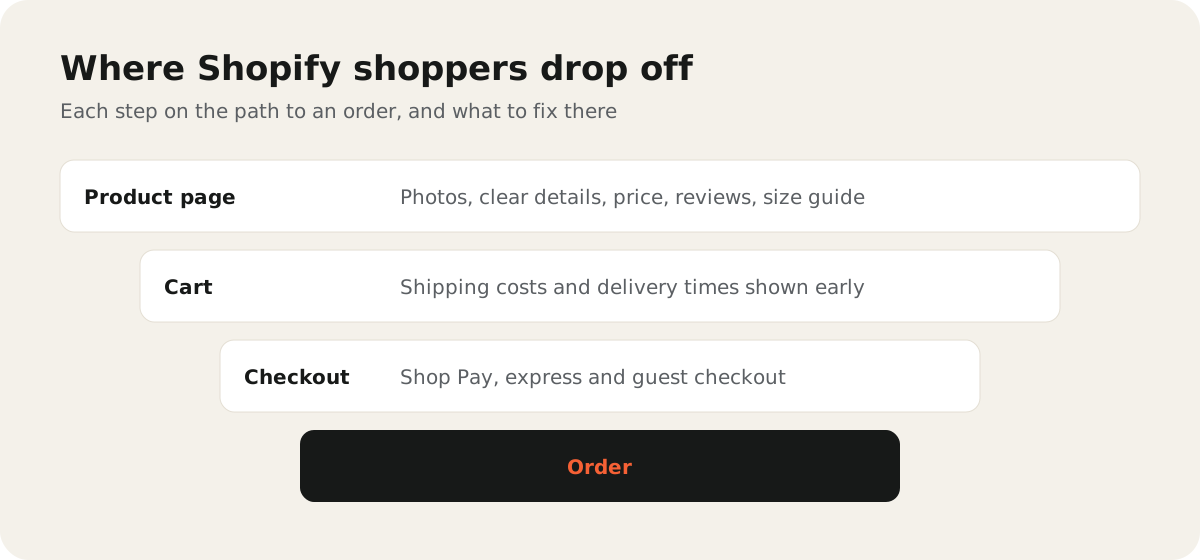
Find out where shoppers drop off
Before you change anything, look at where people leave. In Shopify admin, open Analytics and find the conversion funnel reports. They show how many sessions add to cart, reach checkout, and complete an order.
- Few add to cart: the problem is usually the product page, the price, or the quality of the traffic.
- Many carts, few checkouts: look at shipping costs and surprises in the cart.
- Many checkouts, few orders: look at payment options, forms, and trust.
There is no single "good" conversion rate. It depends on your product, price, and where your traffic comes from. Compare your store with itself over time, not with a number you read online.
Make product pages answer every question
A shopper can't touch your product, so the page has to do the work.
- Use clear photos from several angles, and show the product in use and at real size.
- Write descriptions that answer practical questions: size, material, fit, care, and what is in the box.
- Show the price, variants, and stock status clearly, close to the add-to-cart button.
- Add a short size guide or FAQ where shoppers often get stuck.
Takeaway: read your customer emails and chat messages. Every question people ask before buying belongs on the product page.
Build trust
New visitors don't know you yet. Small signals help them feel safe.
- Show real customer reviews.
- Make your return policy easy to find and easy to read.
- Show contact details, and answer messages quickly.
- Keep the design clean and consistent. A store that looks unfinished feels risky.
Never add fake reviews or made-up badges. They break trust, and they can break consumer protection rules too.
Be upfront about shipping
Unexpected costs at checkout are a common reason shoppers leave. Show shipping early.
- State shipping costs and delivery times on product pages and in the cart.
- If you offer free shipping above a set amount, show how close the cart is to it.
- Make returns information easy to find before purchase, not only after.
Make checkout fast
Shopify's checkout is already well tested, so most gains come from the options you turn on.
- Shop Pay: lets returning Shop Pay users check out with saved details.
- Express checkout buttons: Apple Pay, Google Pay, and PayPal let shoppers skip typing.
- Guest checkout: don't force people to create an account to buy. You can invite them to sign up after the order.
- No surprises: taxes, shipping, and discounts should match what the shopper saw earlier.
Check your options in Settings > Checkout and Settings > Payments.
Design for mobile first
Most store visits happen on phones, so test your store on a real phone, not only in a desktop browser.
- Keep the add-to-cart button easy to reach.
- Make text readable without zooming, and buttons big enough to tap.
- Remove pop-ups that cover the page on small screens.
- Keep the store fast. Our guide to Shopify speed optimization shows the steps.
Test changes one at a time
Guessing is expensive. Change one thing, measure the result, and keep what works.
- Pick one page and one change, such as a clearer shipping message.
- Run it for at least a full week of normal traffic, and longer if your store has few orders.
- Compare conversion rate and average order value before and after.
- Write down what you changed and when, so you can link results to changes.
Small stores often don't have enough traffic for formal A/B tests. In that case, make careful before-and-after comparisons, and watch for traffic changes, such as a sale or a new ad campaign, that could skew them.
A quick conversion checklist
- Review the conversion funnel in Shopify Analytics
- Answer common questions on every product page
- Show reviews, returns, and contact details clearly
- Show shipping costs and times before checkout
- Turn on Shop Pay, express checkout, and guest checkout
- Test the full buying path on a real phone
- Change one thing at a time and measure it
If you'd like help finding what stops shoppers from buying, see our conversion optimization and Shopify development services. Still planning your store? Read how much a Shopify store costs.